DVD PixPlay, DVD/VCD/Photo Slideshow Disc Creation Software          
Change History
DVD PixPlay, DVD/VCD/Photo Slideshow Disk Creation Software

For information on upgrading, please see our upgrade page.
 
 
v6.0 Top Ten New Features
 

1. Reveal and Animation Effects

Add pizazz to your title pages and photos by animating or revealing the text and clip art they contain

2. Music CD Support

Rip tracks directly from CD music to play during slideshow

3. Video Soundtrack Support

Now videos can be interspersed amongst your photos and title pages and maintain their soundtrack (for all slideshow formats)

4. New Transition Effects

26 cool transition effects featuring hearts, stars, crosses and explosions have been added to spruce up your slideshow. And effects are now categorized to make it easier to find your favorites

5. Revamped Title Page Editor

We've added a slew of new features to help you create title pages and add text and clip art to your photos: Larger 3D grips to make resizing easier, Alignment guide lines to help line up objects, quick addition of your own images and clip art, improved previews and more.

6. Enhanced Styling

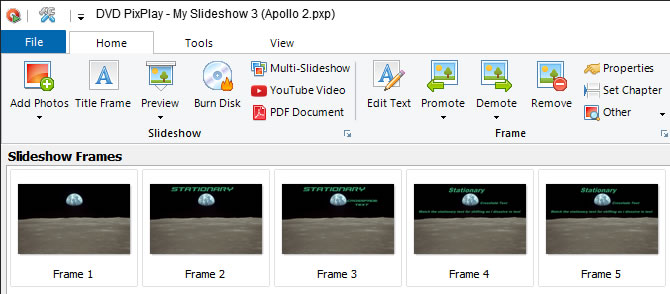
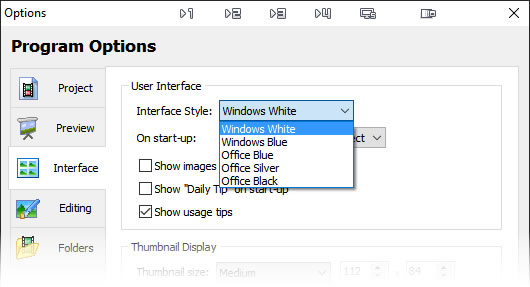
The User Interface has been overhauled with updated graphics, modern windows styled thumbnail grids and a new skin, "Chrome"

7. PC Slideshow Improvements

Navigation of PC format slideshows is now much easier with a new "Go to Frame" dialog and new shortcuts to quickly advance though the slideshow

8. DVD Menu Improvements

20 new DVD menu buttons styles, such as Double Stars, Explosions, Crosses and Hearts, are available to enhance your DVD menus

9. PowerPoint Audio

DVD PixPlay now includes the audio when importing PowerPoint presentations

10. Performance Improvements

We've optimized many DVD PixPlay functions to speed up loading, saving and slideshow generation


Complete Change List

  • Added: Now allows you to convert incompatible formats (such as WMA) to MP3 or WAV
  • Added: Automatically deletes files from your project folders when you remove them from your project
  • Added: Now videos can be interspersed amongst images and maintain their soundtrack (for all slideshow formats)
  • Added: When importing PowerPoint presentations the audio is also included
  • Added: New Reveal effect for title pages and images with text allowing you to reveal text and other objects during display of frame
  • Added: 26 new transition effects featuring hearts, stars, crosses and explosions
  • Added: Improved MCI testing
  • Added: Can now grab music tracks directly from audio CDs
  • Added: Title page editor has circular, 50% larger grips
  • Added: Transition effects are now categorized for easy selection
  • Added: Title page editor now supports undo
  • Added: Improved layout and wording of "Add Shape" dialog
  • Fixed: Progress bar may continue to display in Windows 7 Taskbar when building of a test slideshow completes
  • Added: Project Options dialog now shows previews using the current background
  • Added: Right-click option (or Ctrl+G) to go to any frame when viewing a slideshow
  • Changed: Reversed confirmation checkbox behaviour when removing frames
  • Added: Clip Art dialog now shows preview of custom images added from your computer
  • Added: New Pxp internal formatting for faster loading and saving and reduced size
  • Added: Text properties dialog now shows a preview of the current label style
  • Added: Modern Windows styling of thumbnail grids
  • Added: New UI theme: Chrome
  • Added: Improved styling of skins
  • Fixed: PxpViewer may not display transition effects
  • Added: In title page editor it is now much easier to insert an image from your computer
  • Added: Faster generation of similar frames when building slideshow
  • Fixed: Small memory leak when burning slideshow
  • Fixed: May auto-crop title pages that are not created at the screen ratio
  • Fixed: When previewing DVD buttons they may appear over the text
  • Fixed: DVD menu button style dialog may appear in odd positions
  • Fixed: Sort Slideshow dialog may initially appear without selection
  • Added: Clicking heading in Project properties dialog moves to next checked transition/motion effect
  • Fixed: Filename position may be off after creating a new slideshow project
  • Added: Allows addition of title page when creating a video only project with the wizard
  • Added: Hold down the shift key when clicking navigation keys to move through PC slideshows more quickly
  • Added: New graphics for motion and transition effect previews
  • Added: Now can find the linked image of an Image with Text file even if the project has been moved
  • Fixed: Sweep transition may not display correctly for small images
  • Fixed: When using Improved DVD Aspect ratio buttons may not appear in the correct vertical position
  • Fixed: When previewing DVD menus it may not align text correctly for DVD button objects
  • Added: 18 New DVD menu buttons styles such as Double Stars, Explosions, Crosses and Hearts
  • Added: Objects in Title Page editor now remain visible as they are being moved
  • Added: Title Page editor shows guide lines to help line up objects
  • Added: Locked objects now show with darkened grabs
  • Added: Improved layout of various dialogs
  • Added: New start up tips
  • Fixed: Now supports trailing spaces used for frame captions
  • Added: True preview of frame captions in Project Options dialog
  • Fixed: Select Frame combo box may not display video glyph
  • Added: Select Frame combo box shows chapter breaks
  • Added: When installing a newer version you are redirected to the web site for an updated serial number
  • Added: Updated various UI graphics
  • Fixed: When performing custom zoom from full screen it may not be centered in video output
  • Fixed: In some situations custom motion effect changes may not stick
  • Fixed: More accurate rendition of motion effects when output does not match designed aspect ratio
  • Fixed: When manually navigate a PC slideshow it may upset the frame timing
  • Added: Now confirms removal of slideshows from a multishow project
  • Added: Now prompts to edit a custom menu if slideshow list has changed
  • Added: Improved layout of slideshow list in multishow dialog


v6.10 Change List
  • Added: Now supports MOV, FLV, RM and MP4 format (requires installation of a plug-in)
  • Added: Can now convert problematic formats such as MJPEG to standard AVI
  • Fixed: PNG files may not preview in Clip Art dialog
  • Added: May not clear display panel when finish showing a video
  • Fixed: May get conversion error when burning title pages
  • Fixed: Crampt nodes in directory tree under Windows Vista and 7
  • Fixed: More robust Power Point importing
  • Added: Log now includes a processing summary