Configuring SMS Delivery with MailList King
Contents:
Sign up with a SMS Delivery Service
MLK uses a web-based SMS Delivery Service to send SMS messages to mobile phones anywhere in the world. This allows delivery without complications related to variations between Mobile Phone providers.
We recommend Clickatell as it is fast, reliable and cost-effective.
Note: The instructions below are based on configuration with Clickatell, but MLK should work with any web-based SMS Delivery Service (as long as they offer an HTTP delivery option).
Signing up with Clickatell:
- Go to Clickatell.com
- Click the Buy Now button
- In the "New Customers" box, choose the "Clickatell Central (API) product"
- Specify your address and order information
Note: You will need to remember the username and password that you use to sign up. Also, you will need to specify a mobile phone number for confirmation (Initially this phone number will be used as the sender/reply number for the SMS messages you send).
Other SMS Delivery Companies: Some UK customers have recommended TextAnywhere.net. Download our TextAnywhere Configuration File (View the Readme.txt file in the zip for installation information).

Configure your SMS Delivery Service Settings
You will need to create and retrieve an "API ID" for MailList King to send your SMS messages:
- Sign into your account using the link at the top of clickatell.com
- Choose the "Manage Products" tab
- Beside the "HTTP/S" item, click "Add Connection"
- Specify a name such as "SMS-Delivery" and leave all other fields blank
- Copy the API ID shown on the following page
Clickatell requires you to authorize any phone numbers you use as the reply number for your SMS messages. The mobile phone number you specified when
signing up is automatically authorized. To authorize a different number:
- Click on the "My settings" tab
- Select the "Manage sender IDs" link
- Click the "Add sender ID" link and enter the mobile number
Configure your SMS Settings in MailList King

Finally you need to enable and configure SMS in MailList King:
- Run MailList King and select File > Options, Other
- Check the "Enable Sending of SMS" option
- Click "Settings"
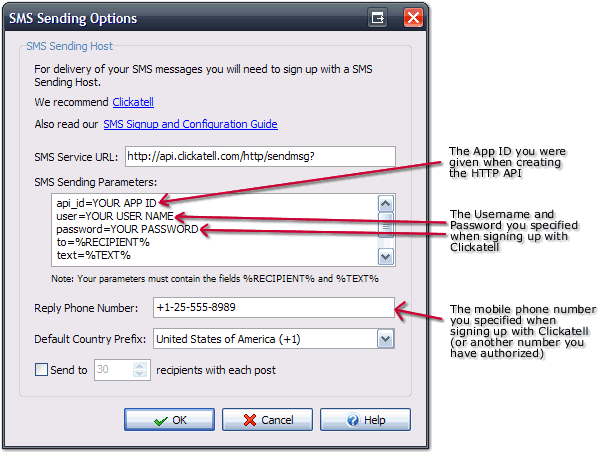
- Specify following options:
SMS Sending Parameters
After "api_id=" specify the API ID you were given when creating the HTTP API
above. After "user=" and "password=" specify the username and password you used when signing up with Clickatell. Leave the remaining as is.
Reply Phone Number
You can only specify a phone number you have authorized with Clickatell. This will be either be the mobile phone you used when signing
up, or another number you have authorized using the method above.
Default Country Prefix
In your mailing list mobile phone numbers can either be in domestic format, e.g. 025-555-8989 or international format +1-25-555-8989 (dashes, spaces and leading plus symbol are all optional). If a number is in domestic format (with a leading zero, e.g. 025-555-8989) then it will be sent with the specified country prefix.
Recipients per Post
You can speed up delivery by allowing MLK to batch send multiple SMS messages with a single post. However if this is done your failed delivery report will not be reliable as bad phone numbers in a post will cause all numbers to be reported as failed (even though will have been sent).
Sending your SMS Messages
Select your recipients using groups, filters or searching as with sending of
emails, then select List > Send SMS to Mailing List.
You can also right-click a selection of members and choose "Send SMS message
to Selection"
|