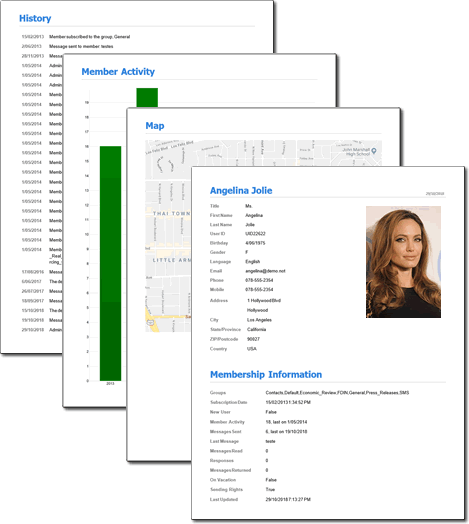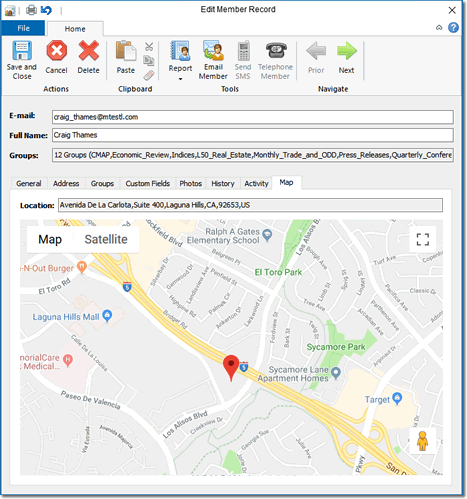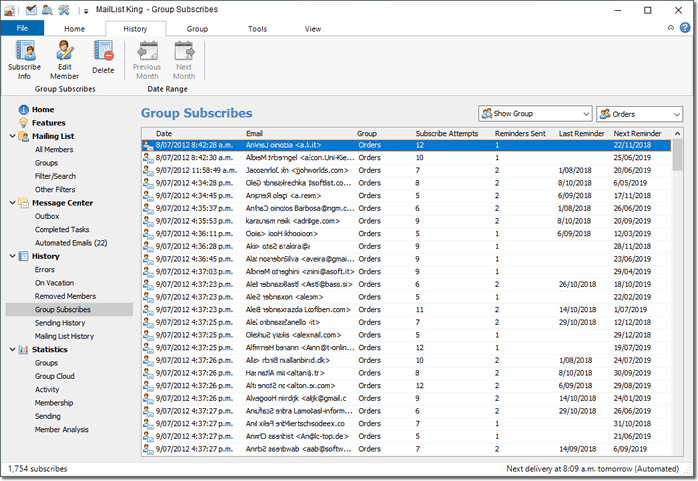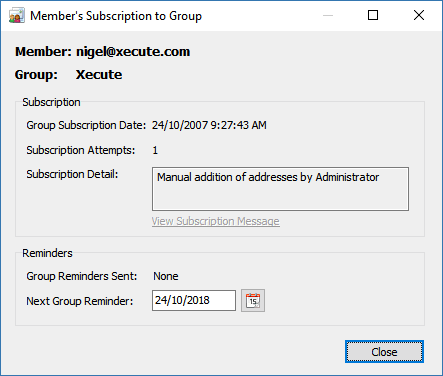
MailList King v7.0 is a major upgrade that incorporates over 150 enhancements, with particular focus on improving the interface and common dialogs, delivery speed and searching.
For information on upgrading, please visit our upgrade page.
v7.0 Top Fifteen New Features
| 1. |
More powerful main window with folder tree navigation, viewing and editing of sending tasks and group management |
| 2. |
Can now automatically send a greeting on a member's Birthday |
| 3. |
New "ISP Sending Limits" options allow you to easily specify the restrictions imposed by your ISP and let MLK manage your sending speed |
| 4. |
Improved searching. Easily filter your mailing list by any fields including date fields, send counts, countries, etc |
| 5. |
Much faster and reliable validation method (checking only the domain against DNS server) |
| 6. |
New Sending Summary dialog shown on completion of a sending task and offers instant access to common functions (such as view the log) |
| 7. |
Can now export an Outlook folder of web form messages to CSV (automatically or manually) |
| 8. |
Can now automatically block addresses with unknown Top-Level Domains |
| 9. |
A list of email addresses can now be updated in a batch (e.g. by loading the update list from file) |
| 10. |
Numerous improvements to the Options dialogs to make them less confusing and more easily navigable |
| 11. |
Many other improvements to the User Interface to make it easier to use, particularly the Message Editor |
| 12. |
Improved printing of graphs, including printing of the main graph and Print Preview functionality |
| 13. |
The content of the Help mode can now be changed allowing you to optionally display the discussion forum or support page |
| 14. |
History can now be filtered by a history type (e.g. all Subscribe failures due to an invalid group) |
| 15. |
Many improvements to styling, including better support for Vista enhancements |
Complete Change History
- Added: Field selectors now display values when relevant (e.g. list of countries, languages, groups, etc)
- Added: Warning about lack of a To Address can now be disabled
- Changed: Updated some glyphs that are not consistent with UI
- Added: MLK will now retrieve your SMTP account details directly from Outlook
- Added: Member dialog now displays how long a member has been on Vacation
- Added: Preview dialog now shows whether members are on vacation
- Added: Send status for database members is updated even if paste a send list or choose a sub-selection
- Added: Vacation status for database members is honored even if paste a send list or choose a sub-selection
- Added: Much more control over how MLK handles no group or an unknown group when subscribing and unsubscribing
- Added: Now can edit recipients in the Double Opt-In list
- Changed: Improved formatting of date in Next Sending column
- Changed: Next send column does not show a date if the sending is paused
- Added: Can now enable/disable vacation status using a web form
- Added: Main Graph now shows bars as gradients
- Added: Email sending summary now includes the task creation date
- Added: Now displays progress percentage text in Status bar when searching
- New Fields: Language, Title, Vacation Date, Birthday, Mobile, Gender
- Added: Now guesses the member's language based on their country
- Added: New filter: "Members who have been on vacation since..."
- Added: Can now disable the warning about having specified no groups
- Added: Now can click status items in information tab for more detail
- Added: Now includes an example mailing list member
- Added: New dialog for deletion of groups to make it clearer what will happen to members of the group
- Changed: No longer shows decimal values in main graph left axis
- Added: Now can add, edit and delete groups in the main window
- Added: When registering the software MLK automatically monitors the clipboard and pastes registration details
- Added: Now can choose country from drop down list in the member editor
- Added: Recipients can now be excluded directly from the Preview message window
- Added: Members can be edited directly from the Preview message window
- Added: Now prevents duplicate items from being added to the Removed addresses list
- Added: Help pane now includes a link to the web forum
- Fixed: If cancel changing of message format from HTML to plain text, the selection box shows Plain Text
- Fixed: Slow filtering/searching of the Removed addresses table
- Added: Now printing of messages honors the unsubscribed blocking and excluded list
- Added: Double clicking a message or subscribe entry in the Member history now displays the relevant item
- Changed: Now always reformats large numbers in sending tasks grid according to localization settings
- Added: Now can save processing summary messages directly to file
- Fixed: May not update group selection boxes with new group if it is created in the edit member dialog
- Changed: Now always sets the HTML title
- Fixed: May be unable to navigate Exchange Public folders
- Added: Time sensitive message field to ensure important messages are sent before the app closes (daily backups and birthday greetings)
- Removed: Irrelevant Filter "Display Users from the following countries" (already handled by search filter)
- Fixed: Now correctly returns a null result for unset date fields
- Added: Optimized method for handling column sorting
- Added: Improved performance of Country guessing
- Added: Member dialog now shows how long they have been on vacation (message delivery disabled)
- Changed: No longer shows seconds in time pick controls
- Added: Now always checks for punctuation characters after command words (e.g. UNSUBSCRIBE!)
- Fixed: Some issues related to using localized charsets when sending (header may not be encoded)
- Changed: Letter navigation now searches by the sorted field, rather than email
- Removed: Exit button from main toolbar (unless using minimize to tray option)
- Changed: Improved formatting of next delivery display
- Changed: No longer sends another acknowledgement message for unsubscribing if we have already sent one to the user that day (to handle duplicate unsubscribe requests)
- Changed: Removed many glyphs from main menu to make it less complex
- Added: Now displays a warning message when too many consecutive timeouts are encountered
- Fixed: Not saving default char set
- Fixed: When printing HTML messages MLK may not use your desired printer
- Added: Some improvements to layout of user information message
- Added: Ctrl+A to select all in HTML source and Plain text body editor
- Fixed: Problem for Outlook processing addresses with SMTP name same as the email address
- Fixed: May not get popup menu when plain text editing
- Fixed: Live Spellchecking and manual spell checking configuration may be out of sync
- Added: Now digitally signs the Outlook toolbar DLL
- Fixed: If web form contains Email field, but has been specified incorrectly as E-mail then the email is not found correctly
- Fixed: May not start up in info mode when the "Always start in Info mode" option is set
- Fixed: Bounces may display in History without the time stamp
- Fixed: If some custom fields have a lot of data then values may not display in custom fields columns of the main grid
- Added: Select Outlook Dialog is now sizeable
- Fixed: May not remember setting for delayed auto-responder messages
- Changed: Under Vista it now saves the debug log to Xequte's settings folder
- Added: Added Office style shortcuts to message editor
- Changed: Now uses ISO 8601 compliant week numbers
- Changed: Improved internal handling of sub-forms
- Removed: CDO sending support
- Added: Now copes with Outlook returning invalid dates
- Added: Now includes default auto-correction library
- Fixed: If cancel out of HTML to Plain Text conversion, still shows Plain Text in selector
- Added: Now can paste directly from Microsoft Word even if images are embedded
- Changed: Now when modifying an Outlook folder it always shows the current folder as initially selected
- Fixed: May display spelling completed messages when sending if there are no errors found
- Fixed: May not convert MSX addresses that contain embedded SMTP addresses
- Added: Vacation Status and Fix Name Capitalization items to the Edit menu
- Added: Now always ensures an extension is specified when saving a file
- Fixed: Shift-selecting items in the Sending tasks dialog may not update the button status
- Fixed: CRLF chars may not be stripped when displaying errors in the Sending tasks dialog
- Added: Rename Mailing List item to File menu
- Added: Now updates the name of a contact when updating the email address if details are available
- Added: Flushes send status table to disk much more frequently when sending
- Removed: Optimized Folder processing tasks which involve message forwarding or web form processing
- Fixed: CSV sending log, may contain line breaks in unquoted fields
- Added: Now strips illegal characters from group (Outlook category) names when importing contacts
- Added: Now strips single quotes from names found in email addresses
- Added: When retrieving addresses from email software it no longer adds a full SMTP and email only address
- Fixed: Some dialogs may not have hover hints
- Fixed: Some spelling mistakes
- Added: Now can group columns in sending tasks grid
- Added: Now can sort and order columns in the sending tasks grid from the main menu
- Added: Library of optimized routines
- Changed: Unregistered version no longer expires
- Fixed: When change link type it clears irrelevant link text (e.g. email address for a web link)
- Fixed: MLK makes it hard to remove the link of an item
- Fixed: MLK may create allow specification of a link that only includes a prefix, e.g. http://
- Changed: Now always uses MLK's Link editor rather than MSHTML's built-in one
- Added: Always blocks the specification of custom field names that match existing table fields
- Removed: Deprecated "Strip PRE Tags" option
- Removed: Deprecated "Update Fields of Old Entry" option
- Removed: Option for Where to search for mailing list commands has been deprecated
- Removed: New Member option from Edit Member dialog
- Changed: Now can disable grayed group display when changing the membership of large selections
- Removed: Killed dialog that displays the current Outlook sender retrieval method and allows changing to another method (no longer relevant)
- Added: Exposed the option, "Minutes Delay Between Resend Attempts"
- Fixed: Enabling the option not to send messages while Outbox contains messages may cause tasks not to restart
- Fixed: Custom fields used in acknowledgement messages may not be normalized
- Changed: Now if the option is enabled to read personalization fields from the database they will be used in preference to the live (message) value
- Changed: Now prevents sending of messages using restricted sender addresses
- Changed: No longer displays an error if you delete an Outlook message while MLK is processing the folder
- Changed: Default recipient count for messages is 99
- Changed: Modal forms now always use WS_Popup style
- Added: Delivery status text now also shows any reasons for message delay (such as the Outlook Outbox containing items)
- Fixed: May be unable to restart a members message forwarding if a send error was encountered
- Fixed: May not correctly show the total number of recipients for a members forwarded message
- Fixed: Key presses in pop up dialogs may cause grid to lose its position
- Fixed: Escape key may close parent window
- Fixed: May lose position when deleting sending tasks
- Fixed: Searching within results may not return correct records
- Added: Searching within results is now faster
- Removed: Match case search option
- Removed: Inverted search option
- Changed: Uses Reply-To address of a message in preference to Sender
- Fixed: If back up database to email by selecting from menu, it may not send immediately
- Fixed: Exporting contact to Outlook may fail in certain situations when duplicate checking is enabled
- Added: Improved the error message that is displayed when MSHTML chokes on an invalid DocType tag
- Added: Hidden option to hide "All Members" mode
- Added: Can now block addresses with unknown Top-Level Domains
- Added: Now the status bar is themed
- Added: Improved Windows Vista support (Vista style dialogs and other native enhancements)
- Added: Much faster and reliable validation method (checking only domain against DNS server)
- Added: Now can batch process a list of email addresses to update
- Added: Can now export an Outlook folder of web form messages to CSV (automatically or manually)
- Added: Can now send a greeting on a member's Birthday
- Added: New folder tree navigation in main window
- Added: Now can view/edit sending tasks in the main window
- Added: Can now edit groups directly under the groups tab in the Main window
- Added: Now can show a print preview of graphs
- Added: Main membership graph can now be printed
- Changed: Much improved layout of message sending menu
- Changed: Numerous changes and improvements to the Options dialogs to make them less confusing
- Added: New Sending Summary dialog shown on completion of a sending task and offers instant access to common functions (such as view the log)
- Added: The content of the Help mode can now be changed allowing you to optionally display the discussion forum or support page
- Added: History can now be filtered by a history type (e.g. all Subscribe failures due to an invalid group)
- Added: Send dialog now has a status bar that shows total message size, format and recipient count
- Fixed: May not detect image path when using stationey files
- Changed: No longer sets subject to HTML title when using stationery files
MailList King v7.01
- Added: Can now export the mailing list to an HTML file
- Added: New printing option to output as contact sheets
- Added: Select Message Folders dialog is now resizable
- Added: Select Message Folders dialog now automatically adjusts height for the content
- Changed: Improved styling of Select Message Folders dialog when not using Outlook
- Added: Now natively supports Vista Windows Mail
- Added: Save and Save as commands to Send Message dialog (in favour of "Save As File" function)
- Fixed: Open/Save keyboard shortcuts may not function in Send Message dialog
- Fixed: May always display start up wizard if email software is not specified
- Fixed: Third sending method is not used even if specified
- Fixed: No longer checks legacy path locations
- Fixed: Database path may be forgotten
- Changed: DB save errors only verbose on closure
- Fixed: Member's message footer may appear at the start of the message
- Fixed: May reduce size of the group selection box more than is required (when there is no search button)
- Fixed: Trailing line break on sending progress hint
- Fixed: MLK message type not included in save file list
- Added: 8bit support to alternate smtp engine
- Changed: Renamed some sending task column names
- Added: Link editor now detects current link selection
- Changed: Now always encodes spaces in subject specified for mailto: links
- Fixed: Better at handling entries pasted from Excel
- Changed: Always pastes as plain text in the Process Address dialog
- Fixed: When editing the schedule of a sending task the send date/time may be reset
- Fixed: Correct status bar text not displayed when in a task mode
- Fixed: Progress may not show in status bar for some search types
- Added: Recent databases menu now hides the active database
- Fixed: Duplicates may appear in the database when importing/pasting items containing trailing tabs and automatic address fixing is enabled
- Fixed: In some locales you are unable to specify a PM time
- Fixed: Name may not be updated when modifying the full smtp address of a data record
- Fixed: When using ISP delivery limiting, it may not automatically restart tasks that have been delayed
- Added: Double-click shortcuts to Specify Recipients dialog
- Fixed: May not commence send task when the send summary dialog is displayed
- Changed: When exporting the language and sex fields are now output in a readable format
- Fixed: A null birthday is now not exported
- Fixed: Progress dialog does not reduce in height when there is no animation
- Changed: Updated Outlook Express glyph
- Changed: Now always uses in-memory data storage objects for faster access
- Added: Now detects encoded ampersands in filenames
- Fixed: Export dialog does not display an error if no filename is specified
- Fixed: May get erroneous non-processing error for Ignored addresses *
- Fixed: Some HTML functions are not disabled when creating plain text acknowledgement messages *
- Fixed: MLK may crash when you insert a link *
- Added: Now automatically recovers from a invalid class error *
MailList King v7.02
- Added: Can now specify a heading for HTML exports
- Added: Table format HTML export
- Added: Now automatically adjusts the date in saved headings for printing/exporting
- Fixed: May export birthday column twice
- Fixed: May not export group membership of first exported record
- Added: HTML exporting now uses CSS for improved styling
- Fixed: When exporting history a header row is not included
- Added: Can now add extra recipients to an existing sending task
- Added: Size and position of View Recipients dialog is now remembered
- Fixed: Display of sending recipient progress in tasks grid may not be updated if manually change sent status for recipients
- Added: "Find Next" to View Recipients dialog
- Changed: Specifying an asterisk for a wild card search in the View Recipients dialog is now optional
- Fixed: Embedded images may prompt a warning about missing files
- Fixed: May not decode some messages when downloading them via POP
- Fixed: May not save settings if closed on Windows shutdown
- Changed: Made custom filter text less prolix
- Added: Custom member sender reply name can now contain the following variables: %GROUP%, %FULLNAME%, %FIRSTNAME% and %LASTNAME%
- Fixed: Message processing window may obscure other windows
- Changed: Always includes the contact name in the email address when using MAPI
- Added: If From field is displayed in the message editor it defaults to your last sender address rather than the Admin address
- Fixed: Internal SMTP Server may not include a valid message-id tag
- Added: Now strips encoded spaces in command lines
- Fixed: MLK may crash when sending via Outlook 2007 under Vista (Build 403)
- Changed: Now when sending via Outlook it always sends from the Outbox, rather than Drafts as is the Extended MAPI default (Build 407)
MailList King v7.10
- Added: Can now directly open Microsoft Word files into the Send Message dialog
- Added: Can now resize images in the editor using Ctrl+Plus/Ctrl+Minus (on Numeric keypad). Or hold the Shift key down too for bigger resizes
- Added: Now always warns when opening a large database if entire database is being cached
- Added: Can now rename folder processing tasks
- Fixed: If select an entire hyperlink it may not display the URL when clicking the Hyperlink button
- Fixed: Edit menu may be disabled in Send Message dialog
- Changed: No longer avoids creating databases in paths containing single quote chars
- Added: Extra logging for subscription failures
- Changed: Now displays different logging/error messages if the multiple group membership option is disabled
- Fixed: May not delete the messages it sends in Outlook even if the option is specified
- Fixed: When ISP blocking dates wrap around midnight then it might not use the expected ignore day
- Fixed: May add a winmail.dat extension to message when sending via Outlook (meaning that images may not embed)
- Fixed: May get an error if send via Outlook and Extended MAPI is disabled
- Changed: Fix rare 13060 table creation error
- Changed: Now when retrieving addresses from Outlook messages it parses both the HTML and plain text body
- Changed: Mime boundary definitions for main SMTP engine
- Added: Paste in Edit Recipient list now strips any rich text formatting
- Added: Can now have a blank X-mailer
- Fixed: When clicking "Send To Unsent" it waited until you closed the Task properties dialog
- Added: Can now insert and edit tables
- Added: Reduce/Enlarge Image buttons on the send message toolbar
- Changed: Updated Outlook integration library
- Fixed: May get A/V error when display the sort menu
- Fixed: Columns and View menu may show the field name rather than display name
- Added: Now remembers your selected search evaluator
- Changed: Now resets your selected search evaluator when changing search field types
- Fixed: A malformatted message can cause a weird non-functional state
- Added: Now maintains a record of the speed at which messages are sent
- Added: Preview dialog now displays statistics regarding size and delivery time
- Changed: In certain situations a web based background image file could be mistaken for a local file
Purchase MailList King
|
Compare Editions
|
Download MailList King
|
Upgrade MailList King
Xequte Home Page
- Xequte.com Site Map
Copyright Xequte Software 2008
|